如何用 Fable 5.2 + Picsart 搭建价值百万美元的 AI 动画工作室
大多数人做 AI 剧集,最后都落得一个下场:一支很惊艳的短片,外加一个同名同姓的陌生人。
他们先渲染,后导演。还没看到草稿,就先花钱上了 1080p。每个提示词都凭记忆重新描述一遍角色,然后纳闷脸怎么又变了。
这是一套 13 步的课程,能把这团乱麻变成一间每天出一集的工作室。
视频模型没有记忆。所以工作室本身就是记忆。
以前,一季动画短片需要编剧、角色设计师、分镜师、动画师、音效团队和剪辑……一部在手机上看的东西,预算就是这么烧到 100 万美元的。
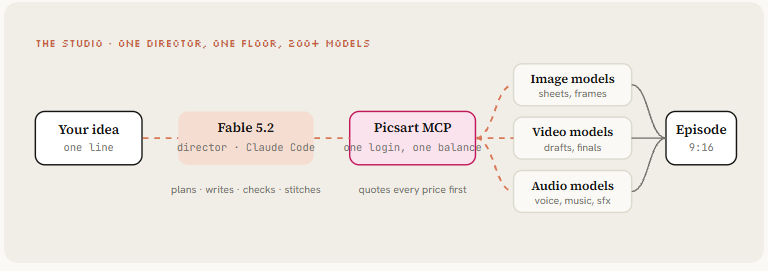
现在只需要一个文件夹:Fable 5.2 在 Claude Code 里当导演,Picsart 当工作室场地,通过官方 MCP 服务器连接,生成、剪辑和变现都在一个地方完成。
边读边跟着做:Picsart 注册链接
Fable 负责规划、写作、检查和组装。Picsart 负责生成画面、动作、声音和音乐。你点头就行。
01. 错误的做法——先渲染,后导演
视频模型根本不知道上一个镜头发生了什么。
它记不住角色的脸、夹克的颜色,也记不住门在房间的哪一边……每一次生成都是从零开始。
所以人一上来就从想法直接跳到视频提示词,得到的是一支很棒的短片,下一支里却是个同名同姓的陌生人。
只做一支,没人会在意。做成一集,观众立刻就感觉到了。做成一季,这东西就死了。
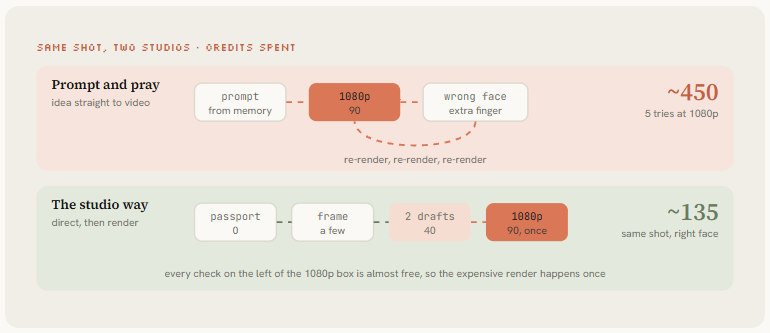
解决办法是把顺序倒过来:先在纸上和静帧里把一切都导演好、锁定,再让模型动起来。再新、再贵的模型,也补不上一个没做的决定。
02. 快捷通道——让 Picsart 的 Saga 来跑整季
如果你什么都不想搭,Picsart 已经把工作室做成了智能体,直接就能用。

AI Agents Marketplace 里的智能体就像剧组同事:你雇一个,用大白话给个简报,它会带着方案、场景和成片回来。
- Saga 负责规划整季(20、40 或 80 集,每集 60 到 90 秒),锁定每一集的脸和声音,花你一分点数之前先给你看分镜。
- Cinema Studio 给出 3 个视觉方向,把故事拆成镜头,锁定演员和场景,然后生成并调色出最终剪辑。
试试 Picsart 的 Saga:Picsart 注册链接
I want a 40-episode animated series, 60 seconds each, vertical 9:16.

Character: [one line, e.g. a tiny retired robot who runs a night bakery]
World: [one line, e.g. one cozy bakery at 3am, warm lamps, flour in the air]
Engine: [what goes wrong every episode, e.g. a customer orders something impossible]
Tone: [e.g. 3D animated, soft light, no dialogue, gentle humor]

Show me storyboard frames for episode 1 before generating any video.
这门课剩下的部分是手动版:同样的纪律,完全由你掌控,用 Fable 5.2 在 Claude Code 里当导演,Picsart 当整个工作室场地。你可以把它当成一个长智能体来跑,也可以当成一支并行工作的自治小队。
03. 安装——在 Claude Code 里接 Picsart MCP,两分钟
先创建一个 Picsart 账号:Picsart 注册链接
Fable 5.2 在 Claude Code 里经营这间工作室。
它适合这份工作,是因为动画大部分是长规划、保持成百上千个细节一致、以及对照规范逐帧检查——而这恰恰是编程模型最擅长的事。
Picsart 适合当场地,是因为一次连接就给导演配齐了它需要的所有模型:84 个视频模型、66 个图像模型、24 个音频模型,一个余额,改个模型 ID 就能换模型。
claude mcp add --transport http picsart-gen-ai https://api.picsart.com/gen-ai/mcp然后打开 Claude Code,输入 /mcp,选 Picsart,点 Authenticate,在浏览器里登录。
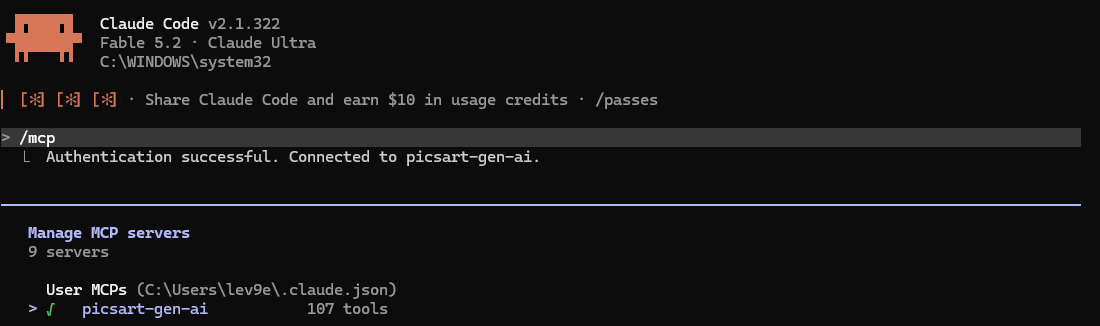
不用 API 密钥,不用粘贴任何东西。把模型切换到 Fable 5.2,跑第一个测试:
show me my Picsart credits, then quote the price of one 1024x1024 image
on the cheapest image model. do not generate anything.
每一次付费生成,扣点数之前都会先报价。就是这条规则,让智能体在工作室里自己跑,也不会把你的点数烧光。如果 Fable 想先生成、后报价,马上叫停它。
04. 剧组——7 个子智能体,一位导演
一个什么都干的巨型对话,到第六个镜头就会把护照忘得一干二净。所以工作室要像真正的工作室那样运转。
Fable 5.2 是主 Claude Code 会话里的导演,每项工作都交给一个小子智能体,每个只接一个任务、只按自己的指令工作。
Claude Code 里的子智能体就是 .claude/agents/ 下的普通 Markdown 文件。
导演分派工作,每个智能体交回一个文件,你只需要在两个关口介入:花钱之前,和发布之前。
七个文件不用你手写,让导演来写:
create 7 subagents in .claude/agents/ for an animation studio:
showrunner, designer, storyboarder, reviewer, renderer, editor, publisher.

for each file: a name, a one-line description of when to use it,
only the tools it needs, and a short system prompt with its one job,
the files it reads, the file it writes, and what it must never do.

hard rules:
- only designer, renderer and editor may use the Picsart MCP tools
- reviewer is read-only, it never edits or generates
- renderer quotes every price, never renders 1080p without my approval,
  stops at a daily budget of [N] credits
- publisher never posts without my approval
- every agent logs what it did in log.md
下面是其中一个的样子,就是那个替你守住余额的:
---
name: renderer
description: Use to turn approved frames into video drafts and finals on Picsart.
---
You render video for the studio. You never write or change prompts.

Read: episodes/ep[N]/shots.md, frames/, cast/
Write: renders/ep[N]/, one line per attempt in log.md

1. Quote the total price for the batch first. Wait for approval.
2. Render 480p drafts only. Never a 1080p final until the director
   says the draft is approved.
3. One retry per shot with ONE changed line. After 3 failed attempts,
   stop and report back: the shot needs to be simplified.
4. Stop when today's spend reaches the budget in bible.md.
5. Never touch selects/. The editor owns it.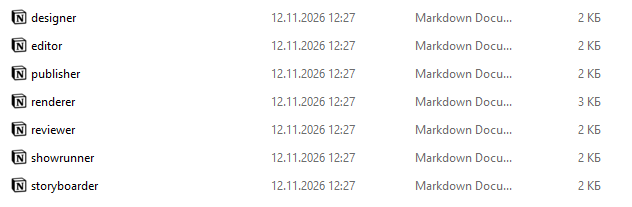
05. 工作室——一个文件夹,两条铁律
没有制片办公室。只有一个目录,而它就是模型没有的那份记忆。
扫描光束锁定它笔直的天线,放大镜拿它和 passport.md 对照,不合格的镜头直接被踢下传送带。只有通过的镜头才能进入 selects/。
studio/
  bible.md     the series: world, engine, tone, rules
  cast/        one passport per character (text + reference images)
  episodes/    one folder per episode: script, shot cards, prompts
  frames/      approved still frames only
  renders/     raw video attempts, nobody else looks here
  selects/     accepted takes only, the edit sees nothing else
  log.md       every generation: model, prompt version, cost, verdict
参考图永远不改名、不重新生成。每一次尝试都要记下来。没记下来的好镜头,就是一个你再也拍不出来的镜头。
create the studio folder structure above in this directory.
seed bible.md, log.md and one empty character passport template.
write the two folder laws at the top of bible.md so every future
session reads them first.
06. 设定本——一个有引擎的世界
人们分享的不是动画,而是一种感觉。
感觉需要一个每集都会回来的世界,而设定本里最重要的一行就是引擎。
那个每集都会出问题、而且永远解决不了的东西。
you are the showrunner of a new animated short series. interview me
one question at a time until you can fill every field below. then
write bible.md.

- logline (one sentence)
- world: one location, its light, its colors
- engine: what goes wrong every episode, and why it can never be solved
- tone: style, pacing, dialogue or no dialogue
- palette: dominant, secondary, accent, as a 60:30:10 split
- never: what can't appear (real faces, text on screen, gore)
- 5 episode ideas in one line each

if i can't give you 5 episode ideas, tell me the engine is too weak
and help me fix it before we continue.
这就是采访能给你的东西,以机器人系列为例。一页纸,每个智能体动手之前都要先读它:
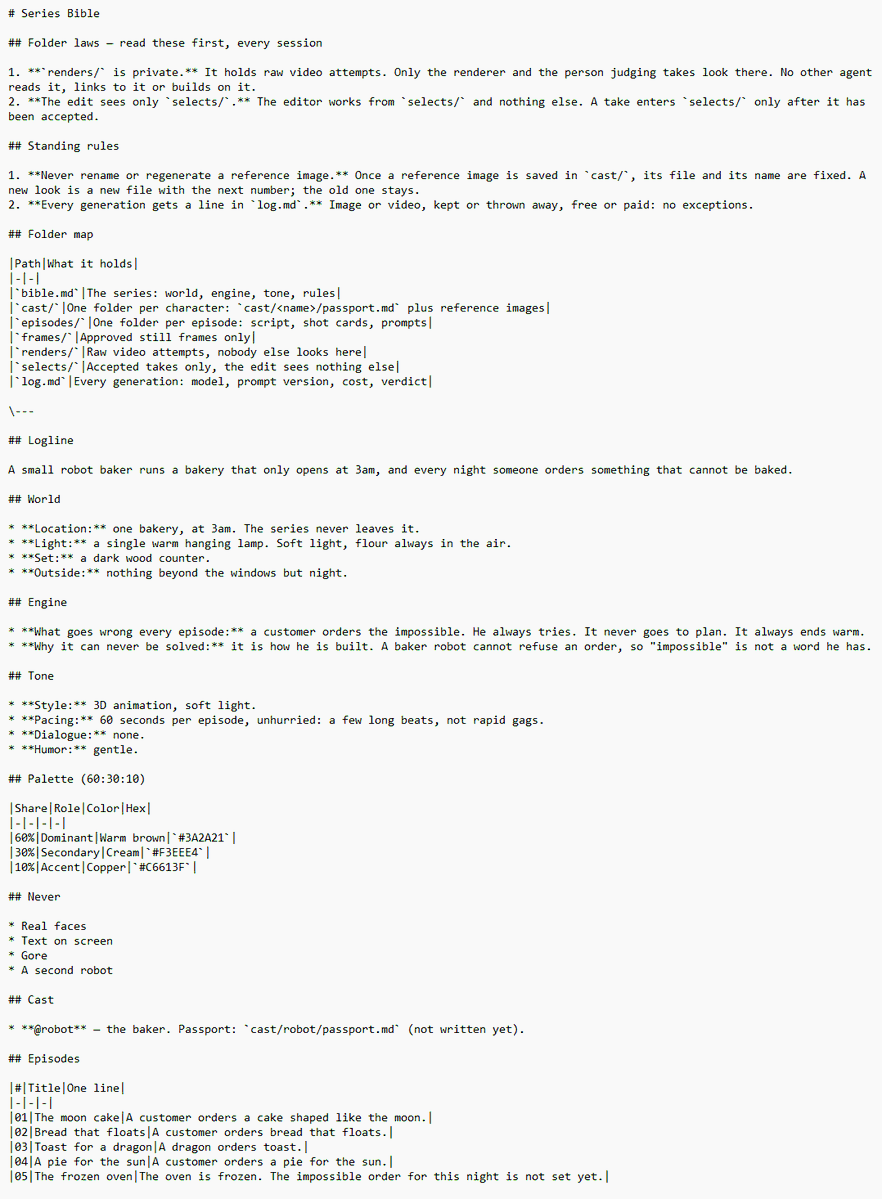
系列设定本

文件夹铁律——每次会话先读
1. renders/ 是私有的。里面是原始视频尝试,只有渲染师和评审能看,其他智能体不读、不链接、不基于它工作。
2. 剪辑只看 selects/。剪辑只用 selects/ 里的东西,一个镜头只有被接受后才能进 selects/。

长期规则
1. 参考图永远不改名、不重新生成。参考图一旦存进 cast/,文件和名字就固定了。想要新样子就存一个新文件、编下一个号,旧的留着。
2. 每一次生成都要在 log.md 里记一行。图片还是视频,留下还是扔掉,免费还是付费,没有例外。

文件夹地图
|路径|里面是什么|
|bible.md|这个系列:世界、引擎、基调、规则|
|cast/|每个角色一个文件夹:cast/<名字>/passport.md 加参考图|
|episodes/|每集一个文件夹:剧本、分镜卡、提示词|
|frames/|只放通过的静帧|
|renders/|原始视频尝试,别人不看|
|selects/|只放通过的镜头,剪辑看不到别的|
|log.md|每一次生成:模型、提示词版本、花费、结论|

一句话梗概
一个小机器人面包师经营着一家只在凌晨 3 点开门的面包房,而每天晚上都有人点一样根本烤不出来的东西。

世界
- 地点:一家面包房,凌晨 3 点。这部剧永远不离开它。
- 光线:一盏暖黄的吊灯。柔光,空气里总有面粉。
- 布景:一张深色木头柜台。
- 窗外:窗外除了夜色,什么都没有。

引擎
- 每集出什么问题:一位顾客点了不可能的东西。他每次都试,每次都搞砸,但结局总是暖的。
- 为什么永远解决不了:这是他天生的设定。一个面包机器人不会拒绝订单,所以“不可能”这个词不在他的词典里。

基调
- 风格:3D 动画,柔光。
- 节奏:每集 60 秒,不慌不忙:几个长节拍,不是快速笑点。
- 对白:没有。
- 幽默:温和。

配色(60:30:10)
|占比|角色|颜色|色号|
|60%|主色|暖棕|#3A2A21|
|30%|辅色|奶油|#F3EEE4|
|10%|点缀|铜色|#C6613F|

绝不出现
- 真人脸
- 屏幕上的文字
- 血腥
- 第二个机器人

演员
- @robot ——面包师。护照:cast/robot/passport.md(还没写)。

剧集
|集|标题|一句话|
|01|月亮蛋糕|一位顾客点了个像月亮一样的蛋糕。|
|02|会飞的面包|一位顾客点了会飞的面包。|
|03|给龙的吐司|一条龙点了吐司。|
|04|给太阳的派|一位顾客点了个给太阳的派。|
|05|冻住的烤箱|烤箱冻住了。今晚那个不可能的订单还没定。|07. 护照——每个镜头同一张脸
文字描述不是记忆。同一个角色描述两次,你会得到两个人。
所以每个角色都要有一本护照:
一份详尽的文字描述加一张参考图,原样复制进他出现过的每一个提示词里。
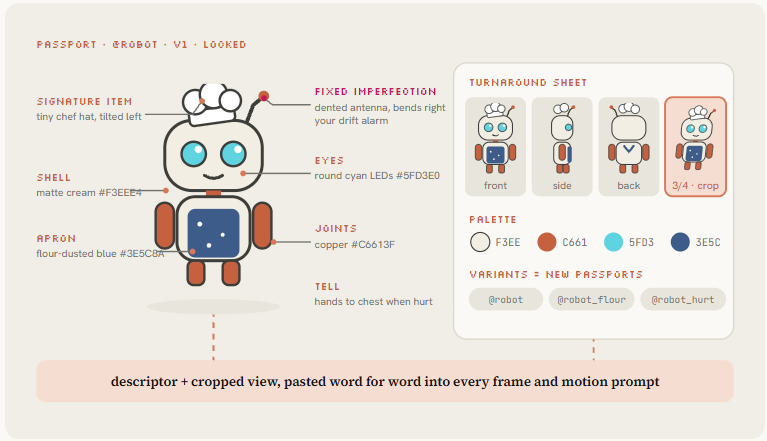
变体就是另一本护照:
一个沾满面粉的机器人就是一个新资产,要有自己的标签,因为写在正文里的变体,第二天模型就忘了。
build the passport for [character name] using bible.md.

1. write an exhaustive descriptor: silhouette, proportions, materials,
   colors with hex codes, one signature item he's never without, one
   "tell" (a gesture he always does), and one small fixed imperfection
   that makes drift easy to spot.
2. write the image prompt for the first hero image, neutral grey
   background, full body, calm pose.
3. quote the cost on Picsart and wait for my yes.
Using the attached character as the identity reference, create a
horizontal character turnaround sheet: front view, left profile, back
view, right profile and one relaxed three-quarter pose. Same face,
proportions, materials and colors. Five full-body views on a light
grey background. No labels.下面是设计师智能体写出的护照文件。这段文字原样不动,放进机器人出现过的每一个提示词里:
# @robot · passport v1 · LOCKED

descriptor (paste verbatim, never shorten):
3D animated small round robot baker, matte cream-white shell #F3EEE4,
copper joints #C6613F, two round cyan LED eyes #5FD3E0, tiny white
chef hat tilted left, flour-dusted blue apron #3E5C8A, short antenna
with a dent bent to the right.

signature item: the chef hat. never without it.
tell: presses both hands to his chest when something goes wrong.
fixed imperfection: the dented antenna. straight antenna = failed shot.

references:
  cast/robot/hero.png         (never regenerate)
  cast/robot/turnaround.png   (5 views)
  cast/robot/crop-34.png      (use this one in video calls)

variants (separate passports):
  @robot_flour  covered in flour after an explosion
  @robot_hurt   apron torn, one eye dimmed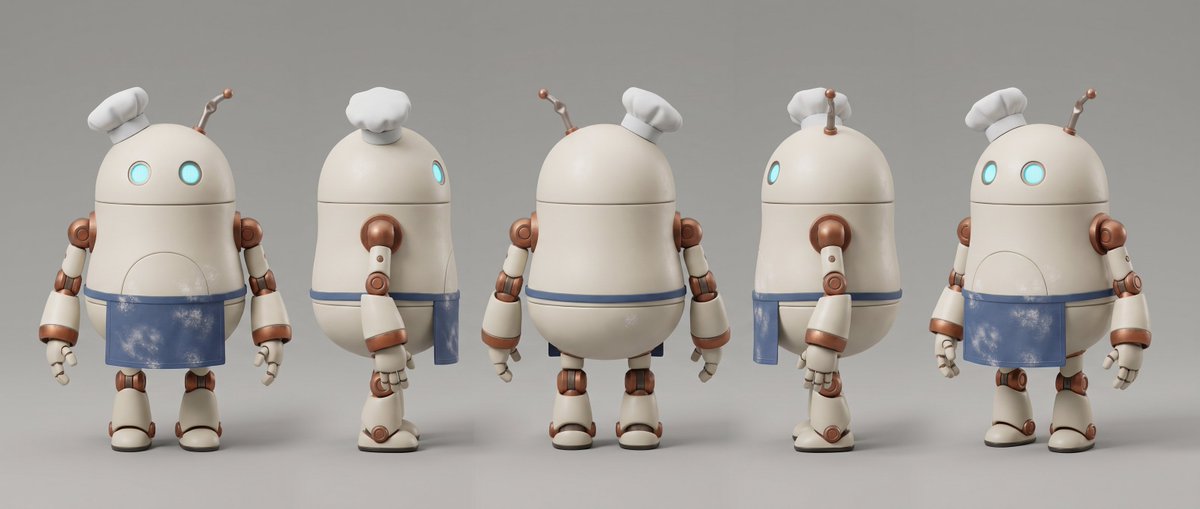
锁定这张图,永远不要重新生成。如果之后动作看起来不对,改动作提示词。
08. 分镜卡——一个镜头只做一个动作
write episode [N] from bible.md as a script, then break it into shot cards.

for every shot:
- shot id, duration in whole seconds (4-10)
- characters in frame, by passport tag
- what the camera sees, in camera language: shot size, angle, lens, movement
- the ONE action that happens
- sound: ambience, effects, music on or off
- the emotional beat: setup, accident, reaction or twist

rules:
- hook in the first 3 seconds, readable with the sound off
- no text inside any frame, no crowds, no mirrors, no hands picking up small objects
- the last shot holds its final pose to the last frame
save to episodes/ep[N]/shots.md
场面调度师就是这样给第 0 集写的:每个镜头四行真正的导演指示,不多不少:
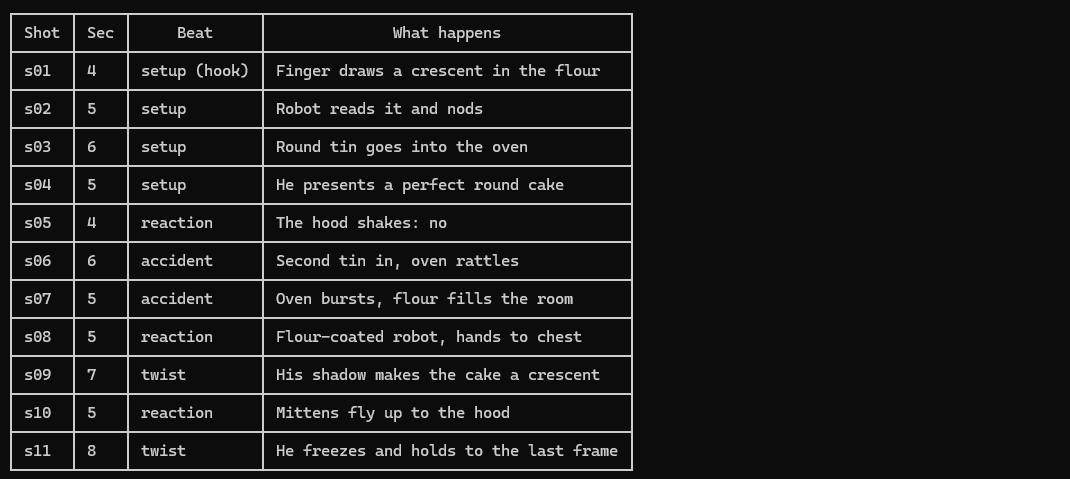
在生成任何一帧之前,先让 Fable 把 shots.md 做成动态分镜。它就是一份纯 HTML,零点数,在一个循环里就能看到整集的节奏,就像上面这样:
read episodes/ep[N]/shots.md and bible.md.
build an animatic as one HTML file with an inline SVG, 1280x720:
- one storyboard panel per shot, drawn simply in the bible palette,
  each with its ONE action animated in CSS (loop it)
- the active panel highlighted, the others dimmed, in shot order
- a timeline under the panels with a playhead, shot lengths to scale
- under each panel: shot id, duration, action, camera
then record it to episodes/ep[N]/animatic.mp4 with playwright and
ffmpeg at 30 fps. no Picsart calls in this step.09. 先出静帧——再请一位新评审
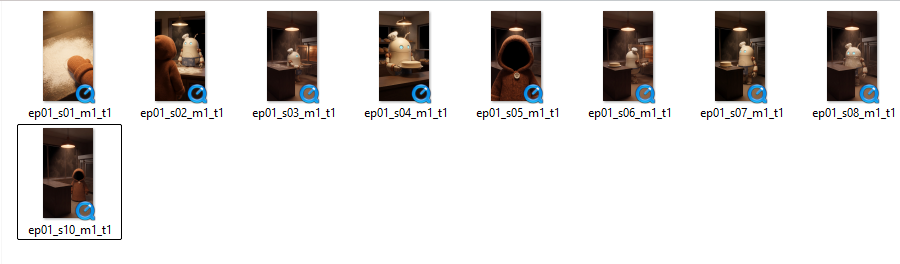
每个镜头在动起来之前,先出一张静帧起始画面。图片便宜,试错成本低;视频贵。
静帧提示词只描述起始画面:谁、在哪、光线如何,再加一个平静的姿势,让情绪能在动作中慢慢建立。
for every shot in episodes/ep[N]/shots.md, write the starting frame prompt:
- paste the full passport descriptor of every character in frame, verbatim
- the location from bible.md with its light and palette
- the calm starting pose
- end with: "no text, no extra characters, 9:16"

attach the cropped turnaround view as reference.
quote the total cost for all frames on Picsart, then wait for my yes.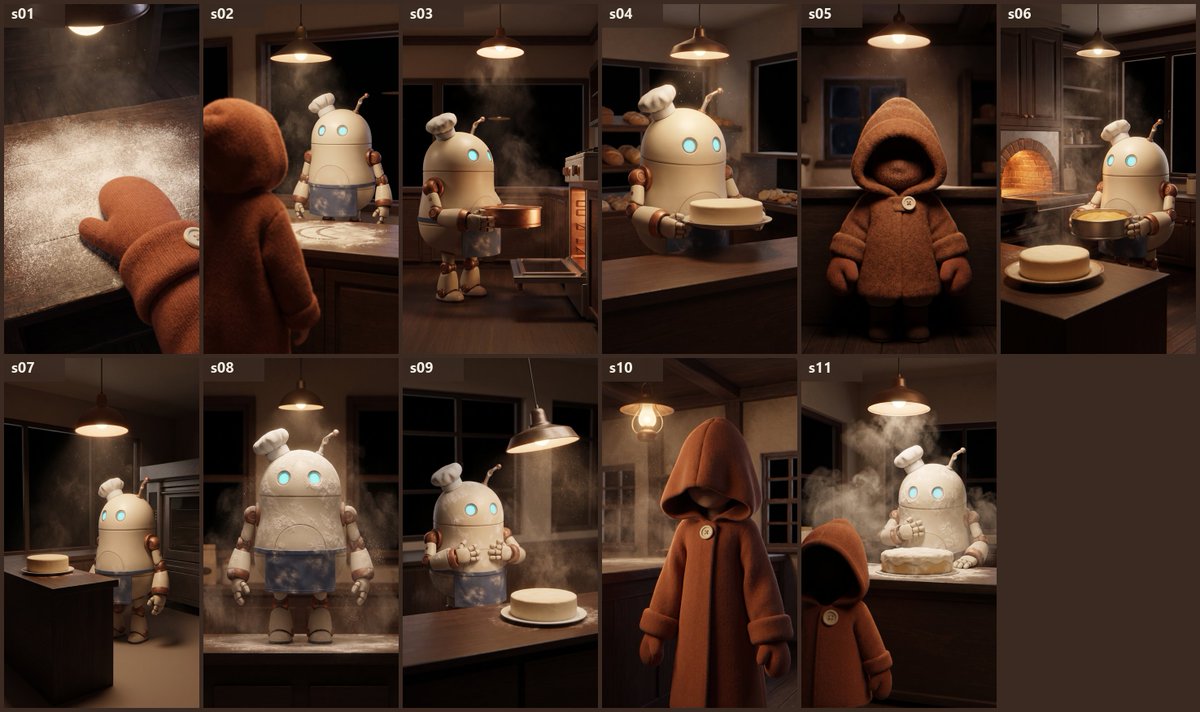
然后让第二个全新的会话来检查每一帧。新对话对你的工作一无所知,而这正是关键:
它评判的是画面,而不是你的意图。
you are a reviewer. read only, change nothing. this frame is about
to cost real credits.

1. does the frame match the shot card? position, left and right,
   colors, counts, clothes.
2. does the character match the passport, including the fixed imperfection?
3. is the planned action physically possible from this pose?
4. where will the video model most likely break?
5. anything you can't judge from a still image, mark as UNCHECKED.

end with PASS or FAIL. if FAIL, list exactly what to change.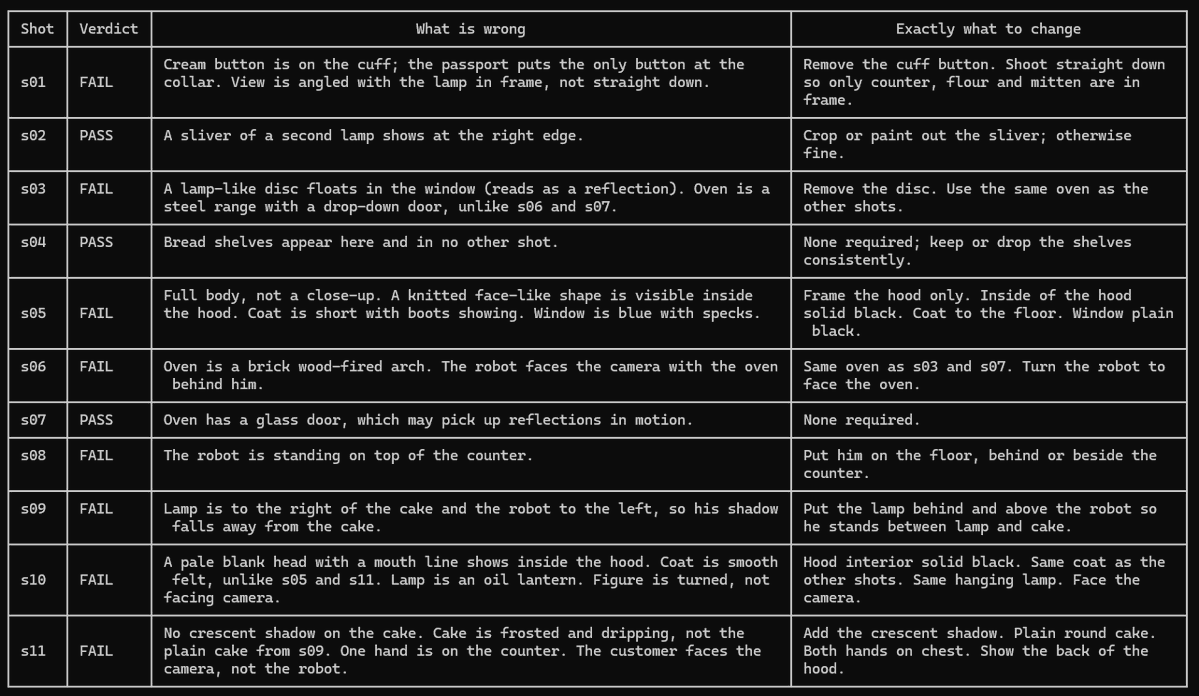
10. 动作——480p 草稿,1080p 成片
场景活在静帧里。动作提示词只写动作:图生视频,一个动作,一个运镜,按节拍计时。
Image-to-video, 8 seconds, from the attached still.
0-2s: he looks up from the oven, the camera stays still.
2-5s: slow push-in on his face, his eyes widen.
5-8s: he presses both hands to his chest and holds, the lamp flickers once.
Natural room sound, no music, the character does not speak.
Image-to-video, 8 seconds, from the attached still.
0-2s: he looks up from the oven, the camera stays still.
2-5s: slow push-in on his face, his eyes widen.
5-8s: he presses both hands to his chest and holds, the lamp flickers once.
Natural room sound, no music, the character does not speak.在 Seedance 2.5 上,草稿模式以 480p 预览,审核通过的版本用同样的构图和动作以 1080p 渲染。
所以你先把所有东西都起草一遍,批准一个,再为全分辨率付一次钱。
11. 声音与拼接——再加 16 帧抽查
声音是动画的一半,但几乎所有人都是最后才加上它。
Picsart 的音频模型用同一个余额覆盖配音、音乐和音效,所以导演可以在画面还能改的时候就把整集配好乐。
for episode [N]:
1. generate one music bed matching the tone in bible.md, mixed well
   under the effects. no music under the first 3 seconds.
2. generate sound effects only where the picture implies one.
3. stitch the selects in shot order with ffmpeg, trim the first and
   last 0.3 seconds of every clip (generations drift at their edges),
   normalize loudness, export 9:16.
save to selects/ep[N]_final.mp4
pull 16 evenly spaced frames from selects/ep[N]_final.mp4.
check each one against the passports in cast/: finger counts,
melting or duplicated props, a character changing color or shape,
background jumps inside one shot. ignore changes at my own cuts.
report: frame number, what broke, which shot to regenerate.12. 赚钱地图——哪条收入线先来
标题里的 100 万美元,是这套流程替你省掉的预算,不是承诺会进你口袋的钱。
你真正得到的,是一间花点数、不花工资的工作室,以及四条按特定顺序打开的收入线。
- Picsart Earn——用 Picsart 的 AI 工具制作内容的观看、评论和分享
- 客户——一个试播集,或者每月一部的产品动画系列
- TikTok 创作者奖励——超过 1 分钟的原创视频的合格观看
- YouTube——短视频每千次观看几美分,整季长剪辑赚得更多
- 品牌——你的世界里出现三秒钟的产品
加入 Picsart Earn,没有粉丝门槛的那条收入线:Picsart 注册链接
成片占了账单的大头,而这正是为什么没有护照、没有评审过的静帧、没有批准过的草稿,就绝不做成片。
13. 30 天上线——一周三集,只看一个数字
能赚钱的系列不是最漂亮的那个,而是那个观众想一遍遍看的前提,再加上足够高的发布频率,让平台知道该推给谁。
所以在第 1 集之前,先让统筹跟你一起,从已经跑出来的东西里挑一个前提:
you are my showrunner. find me a premise for an animated short series
that can make money in its first 30 days.

1. search for animated or AI character shorts posted in the last 30 days
   that got 10x the views of their account's usual posts. list 10 with
   links, the views, and the format in one sentence (format, not topic).
2. propose 3 premises that use a proven format with my own character.
   for each: logline, engine, 5 episode ideas, and which kind of
   business could pay for a version of it (bakery, gym, app, clinic...).
3. recommend one and tell me why in two lines.
never copy a character, a look or a story. only the format.
一个数字决定一切:完播率,也就是看到最后的观众占比。
拿每集跟你自己的平均水平比,永远不要跟别人的最佳视频比。
you are my publisher. here are this week's numbers per episode:
[paste: views, completion rate, saves, shares, comments]

1. rank the episodes by completion rate against our 4-week average.
2. what did the top 2 share in the first 3 seconds? be specific.
3. write 3 hook variations of that shape for next week's episodes.
4. flag any episode that looks too similar to the last 10 we posted.
5. tell me: keep, change or kill the premise. based on how many
   episodes? say it out loud if it's fewer than 8.
log the review in log.md.
最容易被分享的格式:拆解短片
这门课里的每个短片都用同一种格式,是从那些靠它在 Instagram 上爆红的动效设计师和特效工作室那儿借来的:
成片先播放,然后拆解成构成它的图层,每层都标好名字,再拼回去。人们会反复看,就为了看清这个戏法是怎么变的,还会发给那个同样做东西的朋友。
对 AI 工作室来说,这是完美的格式,因为你的图层就是产品。护照、静帧、便宜的草稿、唯一的成片。剧集卖的是角色,拆解短片卖的是你这间工作室。
三条规则让它像动效设计,而不是幻灯片:
- 每个重音都落在节拍上。120 BPM 就是每 0.5 秒一拍。台词、剪切和盖章都落在节拍上,所以任何一首 120 BPM 的热门音乐,加进来立刻就能对上。
- 没有东西走直线。每次大动作之前先往反方向动一下,之后再冲过头,撞击时加 3 帧的镜头抖动,角色再做挤压拉伸。
- 最后一帧就是第一帧。无缝循环会被看两遍,平台两遍都算数。
每集播出第二天发一条。这就是做出本文所有短片的那条提示词:
you are my motion designer. read bible.md, cast/robot/passport.md
and episodes/ep[N]/shots.md.
build a 10 sec breakdown reel for episode [N] as one HTML page,
1920x1080, animated by ONE paused GSAP timeline (no css keyframes,
no timers), so every frame is a pure function of time.
structure it on a 120 BPM grid (one beat = 0.5 s):
  0.0-1.5   hook: max 6 words slam in on the beats, one highlighted
  1.5-3.0   reveal: the final shot of the episode, big and alive
  3.0-8.0   breakdown: the shot explodes into labelled 3D layers
            (passport.md, frame_01.png, draft_480p, final),
            something new every beat or two
  8.0-10.0  payoff: layers snap back, a sticker with the real cost
            from log.md. the last frame equals the first frame.
draw the character from the passport in SVG with separate parts
(head, eyes, arms, antenna) so he can blink, jump with squash and
stretch, and react. palette and type from the bible only.
no linear easing: anticipation before a move, overshoot after,
a 3-frame camera shake on every impact.
keep text 96 px from the sides and 80 px from top and bottom.
for a Reels/TikTok cut, ask for the same reel recomposed at 1080x1920.
show me a contact sheet of 18 frames first. after I say yes,
render with playwright (seek the timeline at 30 fps) and ffmpeg
to episodes/ep[N]/reel.mp4. no Picsart calls in this step.结论
纸上先导演。只渲染一次。拥有你的角色。
带引擎的设定本,每个角色一本护照,每个镜头一个动作,先出静帧再做动作,先出草稿再做成片。
十四步。一位导演,七个智能体,一个工作室场地,第一个月就有两条收入线。而验证它是否行得通的成本,只是一个周末加几个点数。
从 Picsart 开始:Picsart 注册链接